Resource Center
Leverage these resources to maximize the benefits of your floor plan.
I'm Looking For:
Most Recent
Managing Titles Just Got Easier: New Enhancements in Account Portal
At NextGear Capital, we’re committed to making your experience as seamless and transparent as possible. That’s why we’ve introduced powerful new features in the Account Portal designed to give dealers more control and clarity when managing titles. What’s New? Why It Matters Titles are critical to your operations, and we know transparency builds trust. These enhancements are part of our ongoing promise to…
Flex Pricing Available for Heavy Truck and Salvage Inventory
Managing cash flow while keeping your lot stocked with the right inventory can be challenging—especially when you are working with heavy trucks, commercial, and salvage vehicles. That’s why Flex Pricing is here to make it easier than ever. What’s New? Flex Pricing has expanded beyond traditional inventory types to include heavy truck financing and salvage/rebuilder…
Online Account Setup Tutorial
This video shows how to set up your NextGear Capital account using Bridge ID. You’ll learn how to securely access Cox Automotive solutions with a single login.
Bridge ID: How-to Add a New User
NextGear Capital is joining Bridge ID as a part of a strategic plan to adhere to the industry’s best practice of using Multi-Factor Authentication (MFA) and to improve how Cox Automotive solutions work together. Sharing login credentials to your NextGear Capital account portal poses significant security risks. When multiple individuals use the same credentials, it…
Maximize Your Floor Plan Power with the New Account Performance Summary
We’re excited to introduce the new self-service tool, Account Performance Summary, now available in your account portal. This monthly report gives you the insights you need to elevate your dealership’s performance. Drive Strategic Decisions with Data The Account Performance Summary delivers a snapshot of your account’s health, updated monthly. With key performance metrics at your…
Experience the all-new NextGear Capital website
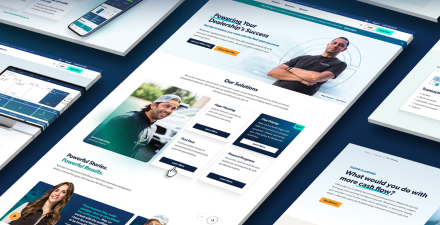
Our website redesign is now live! See what’s new. We’ve overhauled our website with a new look, simplified navigation, and more customer resources to help dealers like you easily access what you need. Reference this blog post for help getting around the new site, and discover everything that’s new! Solutions Under “Solutions,” you’ll find information…
Flex Pricing Now Available in NY, RI, ND & SD
A Floor Plan That Flexes for You With Deferred Payments As an independent dealer, you never know what challenges may come your way—inventory shortages, new expenses, dealership upgrades. That’s why we’ve enhanced our Flex Pricing terms to help you keep cash in-hand longer and stay flexible through every phase of your dealership’s growth. And now,…
Bridge ID FAQs
General FAQs What is Bridge ID? Bridge ID is a Single Sign-On (SSO tool that offers access to multiple Cox Automotive solutions with a single ID and password while enhancing account security with Multi-Factor Authentication (MFA). Who will get a Bridge ID? All NextGear Capital account users will get a Bridge ID. How will Bridge…
Step-by-Step Guide for Existing Bridge ID Users
Already using Bridge ID to access other Cox Automotive solutions? Follow the steps below to connect your NextGear Capital account to your existing Bridge ID account: How to Get Started: Need help setting up your account or have questions about the process? Please contact us at 888.969.3721 and a knowledgeable representative will be more than…